
You want an agent to build something big in one go. The prompt that would get it right is a wall of text, and you write it the only way text can be written: linearly, top to bottom. But the idea in your head is not linear. It is boxes and arrows: this screen leads to that one, this rule feeds that mechanic, this twist only works because of that detail planted earlier.
Version 0.1.17 of HydraOps adds One Shot, the first of its plugins, and it closes exactly that gap. You sketch the idea as a diagram, and the tool compiles the diagram into a single self-contained prompt.
How it works
Plugins in the sidebar opens a drawer of small in-app tools (it was called Complementos when this came out). One Shot was the first: a flow canvas where every node is a piece of your task, with an editable title and a free-text body, and every arrow is a directed connection between pieces. Click a connection to select and delete it, drag an endpoint to re-route it onto another node. Everything autosaves, and diagrams live in a named history panel on the right, most recently edited first, so an idea you parked last week is still there.
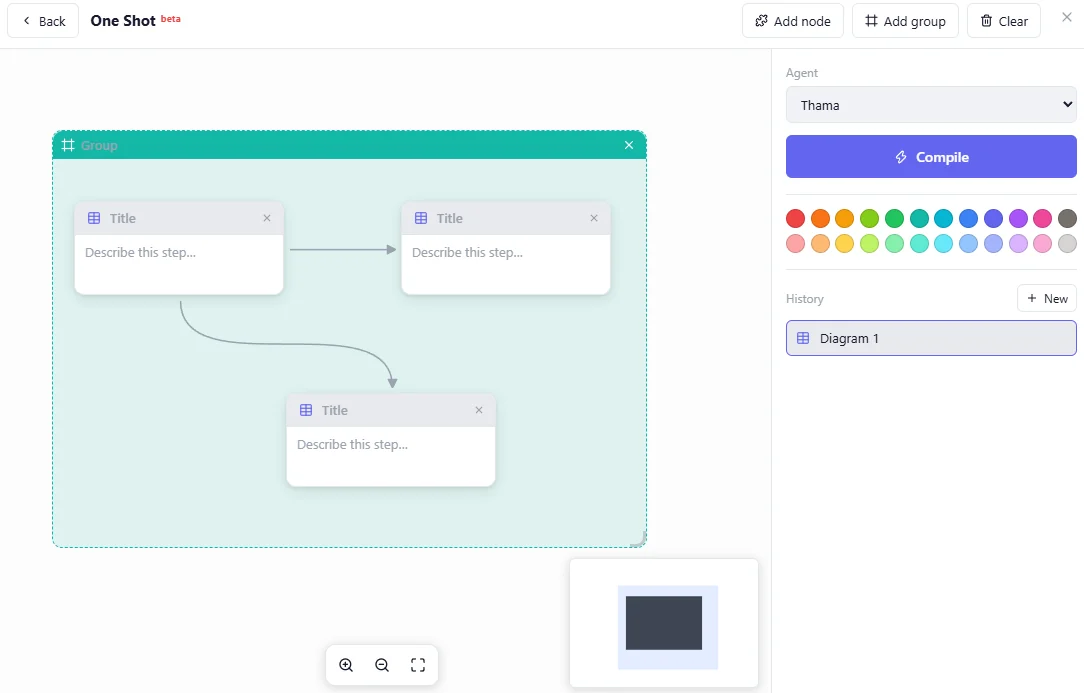
A few weeks of use added what a real diagram needs. Each node can take its own icon, and a palette paints its header (0.1.20). Add group drops a tinted, titled frame around related nodes so they move together, and arrows became curves that no longer overlap (0.1.21). Zoom, fit to screen and a minimap sit at the bottom.
When the diagram says what you mean, you hit compile. The graph, filled nodes and deduplicated edges, goes to the backend, which runs a prompt-engineer system prompt through the LLM you already have configured: the selected agent's model, or the default one. The provider key never appears anywhere in this path; the request goes out through the same credential firewall as every other LLM call in HydraOps.
Out comes one prompt. Copy it and use it anywhere, including a completely different tool. Or press send, and it lands in the selected agent's chat, ready to run.
Here are three diagrams I would actually draw.
A game
Six nodes:
- Concept: a falling-blocks game set in a lighthouse; every few minutes a storm rotates the whole board 90 degrees.
- Mechanics: standard piece set, but pieces freeze wet-side down after a storm; combos drain the water level.
- Controls: keyboard and touch, nothing else.
- Art direction: two-color palette, storm announced by the palette inverting.
- Difficulty: storms get closer together, never faster pieces.
- Deliverable: a single self-contained HTML file, no external assets.
Concept feeds Mechanics and Art direction. Mechanics feeds Difficulty and Controls. Everything flows into Deliverable. The compiled prompt reads like a design document written by someone patient, with the constraints in the right order, and a coding agent can take it in one shot instead of over twenty corrective messages.
A horror story
Nodes again, but now the arrows carry causality:
- Setting: an Antarctic listening post, six weeks into winter, radio checks twice a day.
- The rule: never answer the same transmission twice. Nobody remembers why the rule exists, only that it is old.
- Protagonist: the new operator, who thinks rules without reasons are superstition.
- Escalation: the same transmission starts repeating, each time slightly more familiar in its voice.
- The twist: connected to Setting and to The rule, not to the protagonist. That arrow placement is the story.
- Tone and format: 2,000 words, first person, present tense, no gore, dread only.
Drawing this exposes what a paragraph hides. If The twist has no arrow back to something planted early, you notice: the node sits there, unconnected, and unconnected is exactly how the twist would feel to a reader. Fix the diagram, then compile, and hand the prompt to a writing agent.
A mobile app
The canvas turns out to be a decent screen-flow tool:
- Login: email only, magic link, no passwords.
- Habit list: today's habits as cards, one tap to mark done.
- Habit detail: streak calendar, edit, archive.
- New habit: name, schedule, reminder time.
- Data: local-first storage, sync later, model spelled out in the node body.
- Stack: Flutter, one package for local notifications, nothing else.
The arrows are the navigation: Login to Habit list, list to detail, list to New habit, and Data feeding every screen that reads or writes. Compile it and you get a scaffold-this-app prompt where the screens, the flows and the data model arrive together, instead of being reconstructed by the agent from a rambling description.
Why a graph beats a paragraph
In a paragraph, the thing you forgot is invisible. On a canvas, it is a node with no arrows, staring at you. The compiler's other job is turning topology into order: what depends on what becomes what gets specified first, so the final prompt builds context before it asks for output.
And the diagram outlives the prompt. Recompile after changing one node and you get a new prompt for the cost of one edit. Keep a diagram per project in the history panel and it becomes the living spec, which is more than most prompts ever get to be.
What this does not do
The usual honesty section:
- The prompt is written by the model you configured, so its quality tracks that model. A local 7B will compile a plainer prompt than a frontier model. Both beat pasting your raw notes.
- A one-shot prompt does not guarantee a one-shot result. It raises the floor; the agent on the other end still matters.
- One Shot compiles structure you provide. If the diagram is three vague nodes, the prompt will be three vague paragraphs with better manners.
One Shot ships in v0.1.17, Apache 2.0 like everything else. The second plugin, 3D, has landed since, and more will follow as they earn their place.
HydraOps is a self-hosted multi-agent AI system: one chat, several agents with their own personality, model and tools working on tasks in parallel. Try it here.