
Some requests are cheap to get wrong. Ask an agent for a summary, read it, ask again. Others are not: a research task that burns through dozens of pages, a video that costs real money to render, a note saved to memory that will shape every future answer. For those, the worst moment to find out how the agent understood you is after it has already done it.
Since 0.1.40, HydraOps has an answer for that: put /plan in front of the request. The agent looks around, writes down how it would do the job, and stops. Nothing that changes anything happens until you say so.
Plan mode is enforced, not requested
The obvious way to build this would be to add a line to the prompt: "do not act yet, just plan". That works until the model decides it knows better. A model that has been told not to save something, and still has the tool to save it, is one confident guess away from saving it.
So in plan mode the agent does not get those tools at all. When the task starts, the worker takes the tools the agent is allowed to use and keeps only the ones that read: web search, opening pages, skills, GitHub lookups, its own memory search. Anything whose risk profile says it sends, saves, delegates, creates or generates is left out, and so is anything that always asks for approval. An MCP tool HydraOps does not know is treated as sensitive, the worst case, so it is left out too. The model can describe a step that uses remember or generate_video, but it has no way to call them.
On top of the reading tools it gets exactly one more: propose_plan. That is how the plan comes back: a goal in one sentence, numbered steps with the exact tools each one will use (including the ones it cannot use yet), the agent a step would be delegated to, and the questions worth settling first. Because it is structured data and not prose, the app can draw it as a card instead of a wall of text.
A real run
To show it I used a real agent with a real model (nothing in these screenshots is mocked) and a request that mixes reading with one action that sticks:
/plan Find the three most popular idle games on Google Play in the US, compare them in a table, and save the conclusion to your memory.
The agent searched, opened a few pages to check what the store listings actually expose, and handed back this:
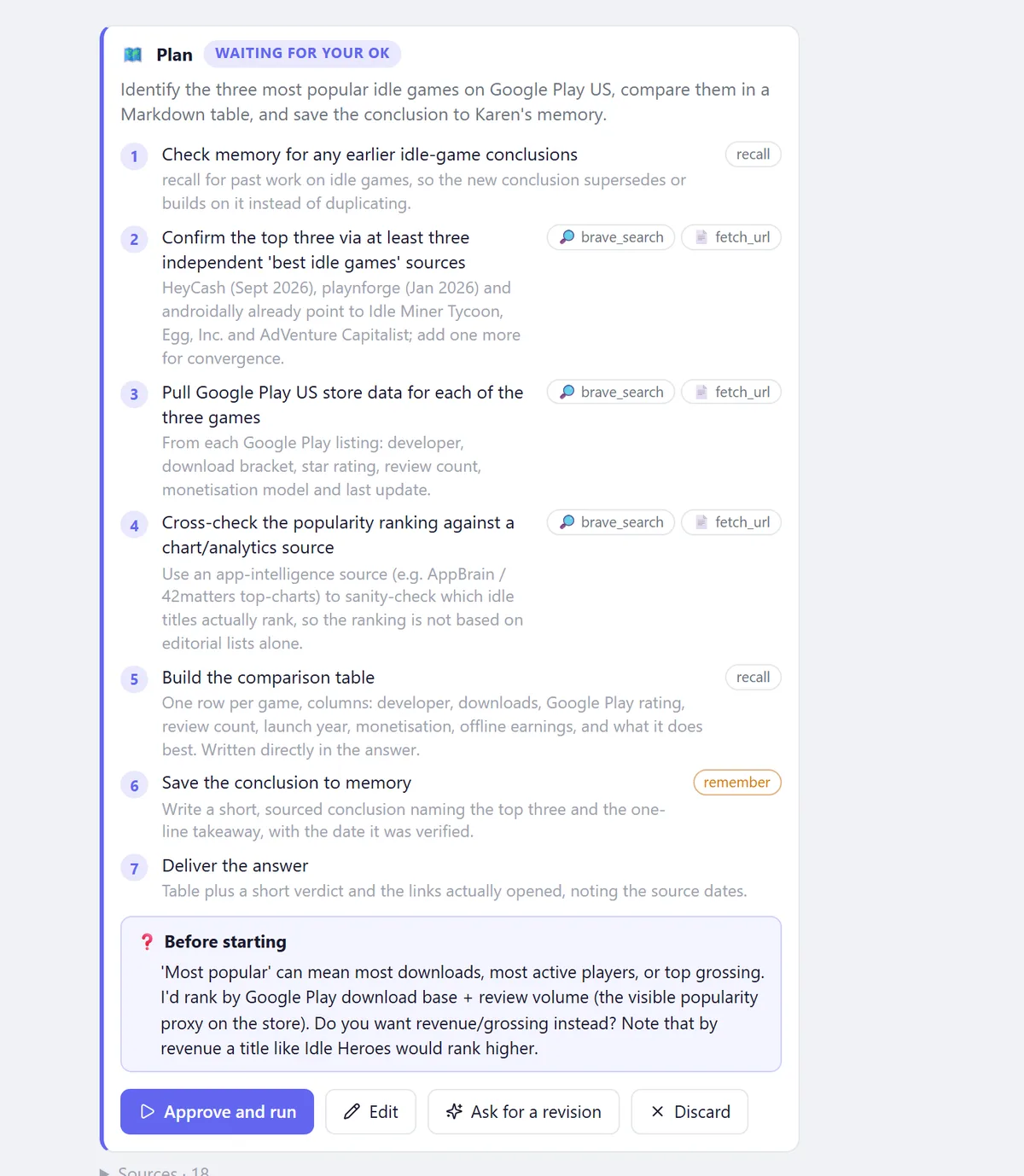
Two things on that card are the reason the feature exists. Step 6 uses remember, and it is marked in orange: that is the step that changes something, and you see it before it happens. And the "Before starting" box asks a question I had not thought about: "most popular" can mean most downloads, most active players or top grossing, and the answer changes the podium. The agent was still allowed to read, so it had already found out that the store only exposes downloads and reviews, and said so.
Four ways out
The card ends in four buttons:
- Approve and run creates the task that does the work, with the agent's full tools.
- Edit turns the plan into text. Drop a step, reorder them, add a detail, and approve that version.
- Ask for a revision lets you say what you would change in plain words.
- Discard ends it. Nothing ran, nothing to undo.
Revision is the one I use most, because it does not ask you to rewrite the plan yourself:
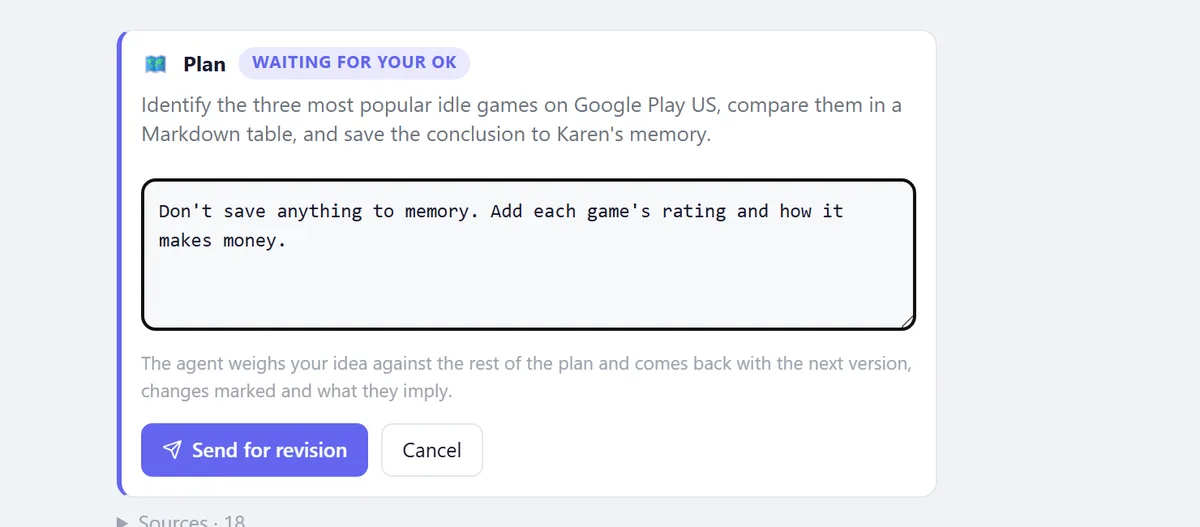
Your notes go back to the same agent, still in plan mode and still unable to act, together with the previous version. It returns the next version in the same conversation, with each step marked as added, changed or removed, and a note on what the change implies for the rest:
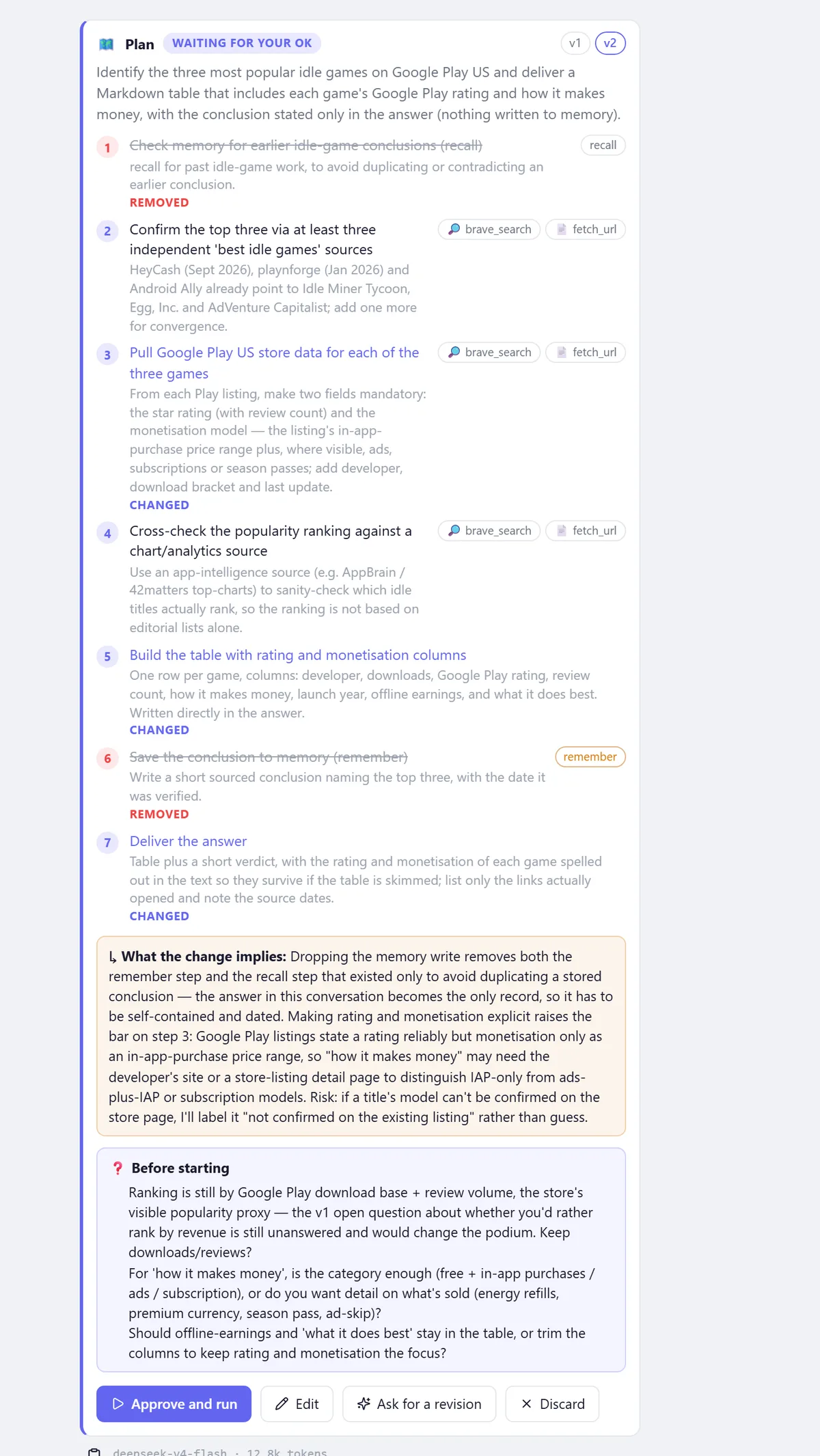
I asked for one thing to go (the memory write) and it removed two. Step 1, a recall to check earlier conclusions, only existed to avoid duplicating a stored note; with nothing being stored, it explained, there is nothing to duplicate. It also warned that Google Play states a rating reliably but monetisation only as a price range, so "how it makes money" might need another source, and that if it could not confirm a model it would say "not confirmed" rather than guess. That note is the part a hand-edited plan never gives you: someone checking what your change breaks.
Removed steps stay in the list, struck through, so you see them go. The v1 · v2 chips at the top jump between versions, and while the last message in the chat is a plan waiting for you, whatever you type is taken as a revision of it (a link below the box sends it as a new request instead).
Carrying it out
Approving creates an ordinary task. Its prompt is your original request plus the approved plan, with an instruction to follow the steps in order and, if one turns out to be impossible, adapt and say so. It runs with the agent's full tools and under the same security rules as any other task: if it reads outside content on the way, sensitive actions are still held for your approval.
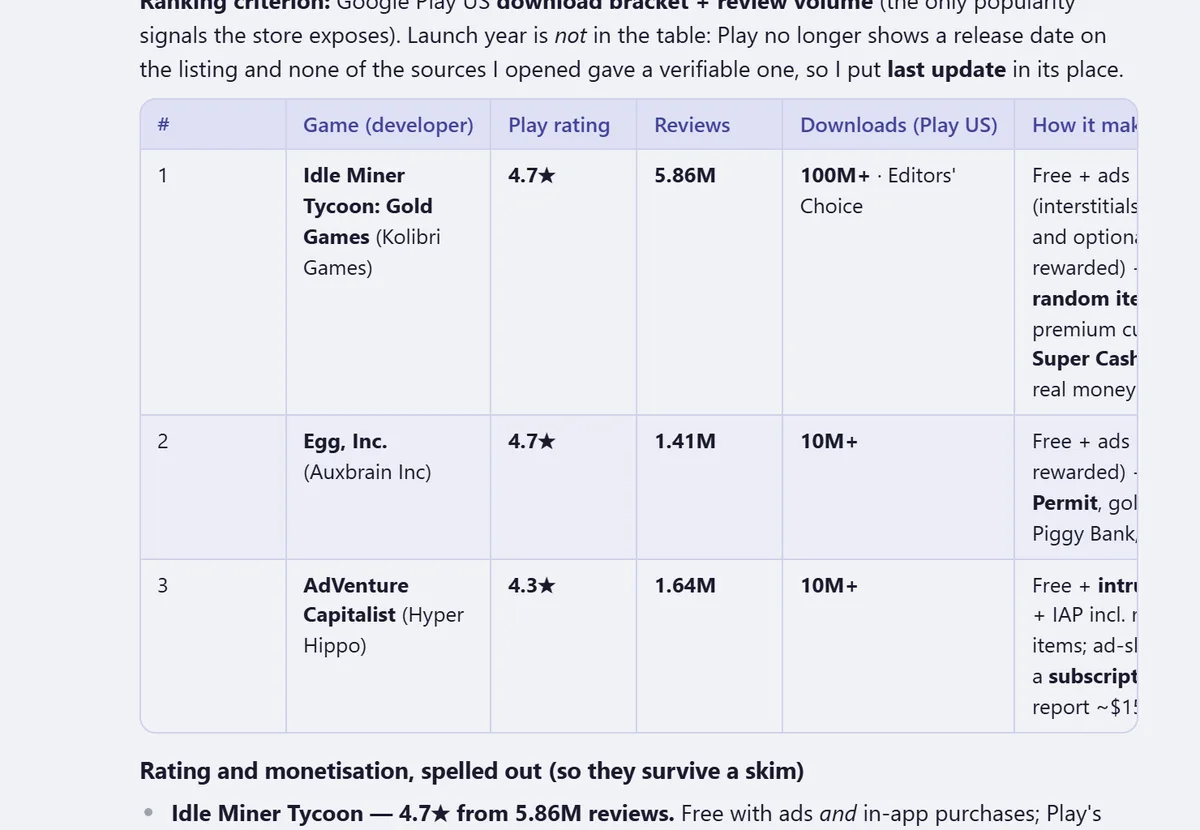
Since 0.1.42 it also starts with the documents the agent already read while planning, so it does not fetch the same pages twice. The result kept to what was agreed: the table with rating and monetisation spelled out, and nothing written to memory.
On Telegram, a plan arrives as a message with ▶ Approve and ✕ Discard buttons. Editing and revising happen in the app.
What this does not do
The honesty section, as usual:
- A plan is only as good as the model that writes it. Plan mode stops the agent from acting; it does not make it smarter. A weak model writes a weak plan, and now you get to read it first.
- Once approved, following the plan is an instruction, not a guarantee. The task is told to stick to the steps and to say so if it has to deviate; the tools are no longer restricted.
- Open questions do not answer themselves. In this run, the "downloads or revenue?" question was still open in version 2. Approving without answering means the agent goes with what it proposed.
- Planning is not free. The agent reads to make a realistic plan, and reading costs tokens. A planning round in this run took about 12,800 on DeepSeek V4 Flash. For a two-line request, just ask.
- The world can change between the plan and the run. The plan says what to check, not what the answer will be.
/plan landed in 0.1.40 (also as /planear and /planificar), and the documents carry over since 0.1.42. The core is one short file, plan.ts, and the filter that decides which tools count as reading is readOnlyToolNames. The manual covers it under Plan before doing.
HydraOps is a self-hosted multi-agent AI system: one chat, several agents with their own personality, model and tools working on tasks in parallel. Try it here.