
If you make images, video or 3D models on your own GPU, odds are you do it in ComfyUI. And odds are you have a handful of workflows you trust: the right models, the settings you spent an evening tuning, that one custom node you had to dig out of a forum thread. HydraOps agents can now use those. You ask in the chat, the agent picks your workflow, changes the two or three values that need changing, runs it in your ComfyUI and drops the result in the chat as a card.
To try it I asked one agent for a house. Then for a 3D model of that house. Then for a short video of it. Three of my own workflows in one chat, and nothing left my machine.

Two pieces: the connection and your workflows
The first piece is the ComfyUI connection, in Tools → Connections. It starts comfy-mcp, the MCP server Comfy Org publishes, pinned to a version I tested and launched with uvx. To be clear about who did what: the server is Comfy Org's, but the connection around it (how it is set up, how its tools are classified) is mine, and Comfy Org has not reviewed or endorsed it. It talks to ComfyUI at the same address your browser uses, so the portable build, the desktop app and a manual install all work, on this computer or on another one in your network.
Like every connection in HydraOps, it comes with a classification of its tools. This one has 39. Looking at your own install (nodes, models, a job's state, validating a workflow) runs freely. Running a workflow, uploading a file or freeing memory acts on your machine. Comfy's online template gallery counts as content from the internet, so once an agent has read it, every step that acts waits for you to approve it. The tools that change your install (updating ComfyUI, installing nodes) and the one that spends Comfy credits on hosted models are there and classified, but the catalog recommends leaving them out.
The second piece is a HydraOps tool, comfy_workflows. It lists the workflows you saved in ComfyUI, prepares one to run and brings back what the job produced. Preparing always happens on a copy, so your saved file is never touched. Your attachments go into the workflow's inputs and only the values you asked for change. It also tells the agent what a workflow file does not say out loud: which values are actually fed by another node (so it does not report a number that never gets used) and which models the workflow needs, with the download link the template itself carries. With it, an agent needs four tools:
comfy_workflows
comfyui_validate_workflow
comfyui_run_workflow
comfyui_job
If you also want it to fetch missing models, add comfy_download_model. It saves the file in the folder your ComfyUI reads for that kind of model, and it asks before every file. An agent that has it no longer gets the connection's own download tool.
Finding models: Hugging Face and Civitai
Two more sets of tools help before you run anything. I did not use them in the test below, but they belong in the picture.
With the line huggingface an agent can search the Hub and read a model's card, license and files, with sizes and links. It can also preview a dataset and check whether your token gets you into a gated model. Anything that writes (creating a repository, uploading, posting in a discussion) waits for your approval.
With the line civitai it can search checkpoints and LoRAs and read a model's license and its trigger words. It can pull up example images with the prompt, sampler, steps, CFG and seed behind them. And if you have a model file and no idea where it came from, it can tell you which Civitai model it is, from a hash computed on your own computer. The Civitai tools only read.
Public content needs no key. A Hugging Face token or a Civitai key stored in HydraOps opens gated models and models behind a sign-in, and comfy_download_model uses them too. The agents never see either: their requests go through HydraOps' key proxy. Adult content on Civitai stays blocked unless you allow it, and that switch is yours; no agent can flip it. The manual has the details for Hugging Face and Civitai.
The test
Windows 11, HydraOps 0.1.75, ComfyUI 0.42.5, an NVIDIA RTX 3090 with 24 GB. The agent ran on DeepSeek Flash for every message, a cheap model that cannot see images. All three workflows were already saved in my ComfyUI. Nothing came from the online gallery and I spent no Comfy credits.
1. The image
I asked for the house with my Z-Image Turbo workflow, seed 0, and a long prompt pasted as is. I also asked the agent to answer in English, since its personality defaults to Spanish.
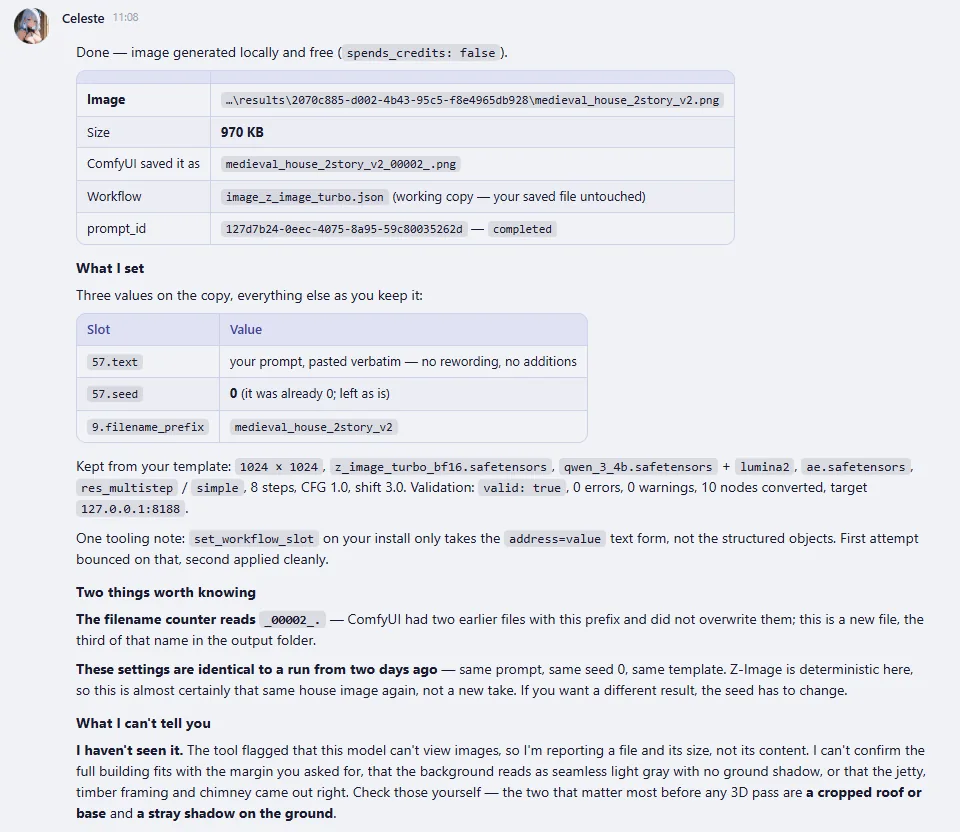
The reply lists the three values it set (prompt, seed, file name) and says everything else stayed as I keep it. Then come two things I never asked for, and they are my favorite part. First, it noticed I had run the exact same steps two days earlier: same prompt, same seed, same template, and Z-Image is deterministic here, so this was almost certainly the same picture again. If I wanted a different house, I had to change the seed. Second, it said plainly that it had not seen the image, because the tool told it this model cannot view images, and that I should check the roof and the base were not cropped before going to 3D.
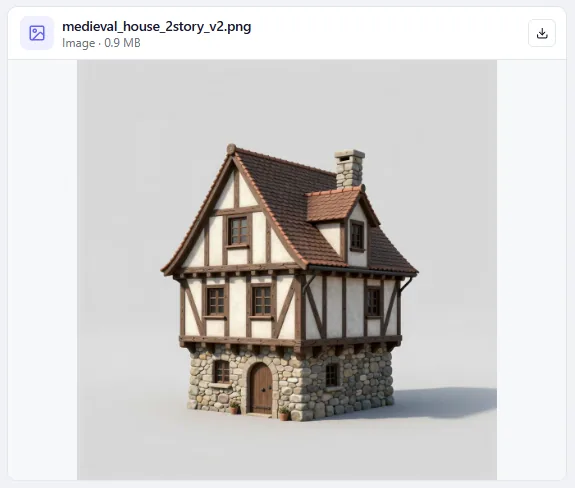
It was right. Byte for byte, the same picture as two days before.
2. The 3D model
Next: "turn that same house into a 3D model with TRELLIS, using my ComfyUI workflow for it". That workflow combines TRELLIS.2 and Pixal3D, and the agent left it alone except for two things. The template still pointed at an old input image, an axe, so it uploaded the house and set that input to it. And it gave the output a file name of its own.
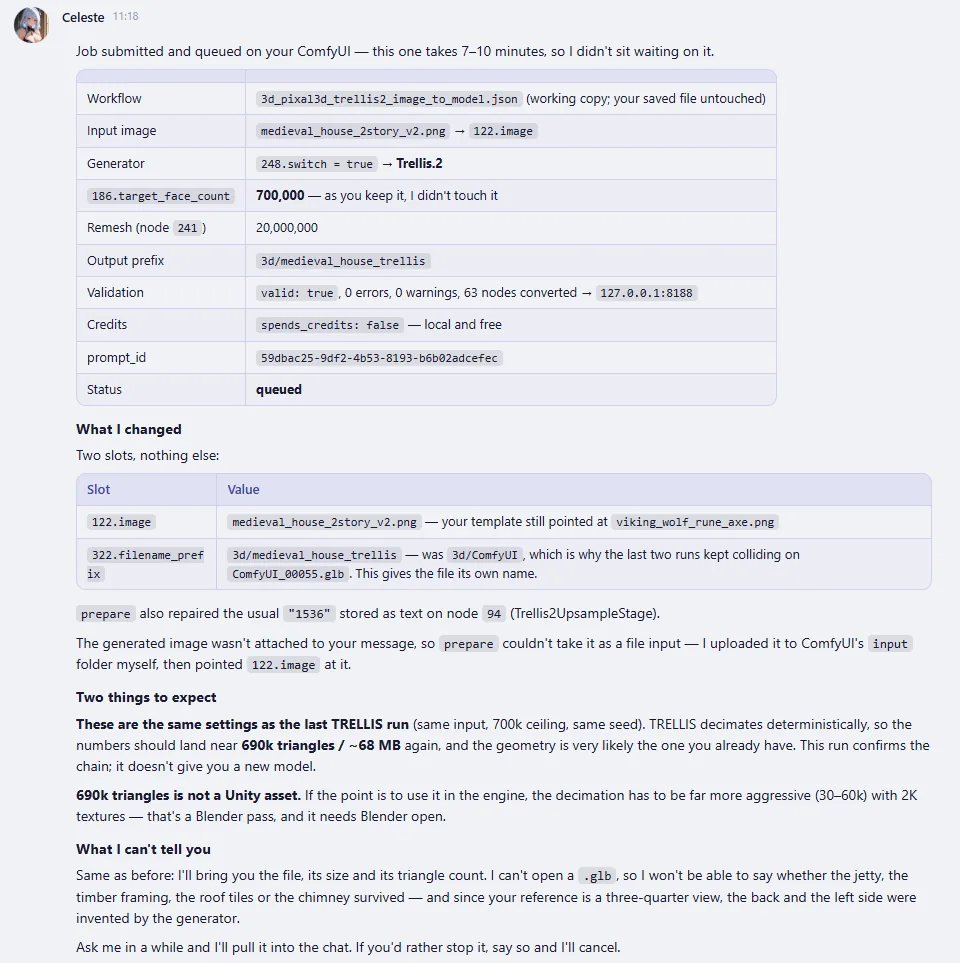
This one takes a while, so the agent did not sit there waiting. It told me the job was queued and what it had set, and gave the turn back. ComfyUI took 9 minutes 10 seconds. Then I asked: "Is the 3D model done? Bring it to me."
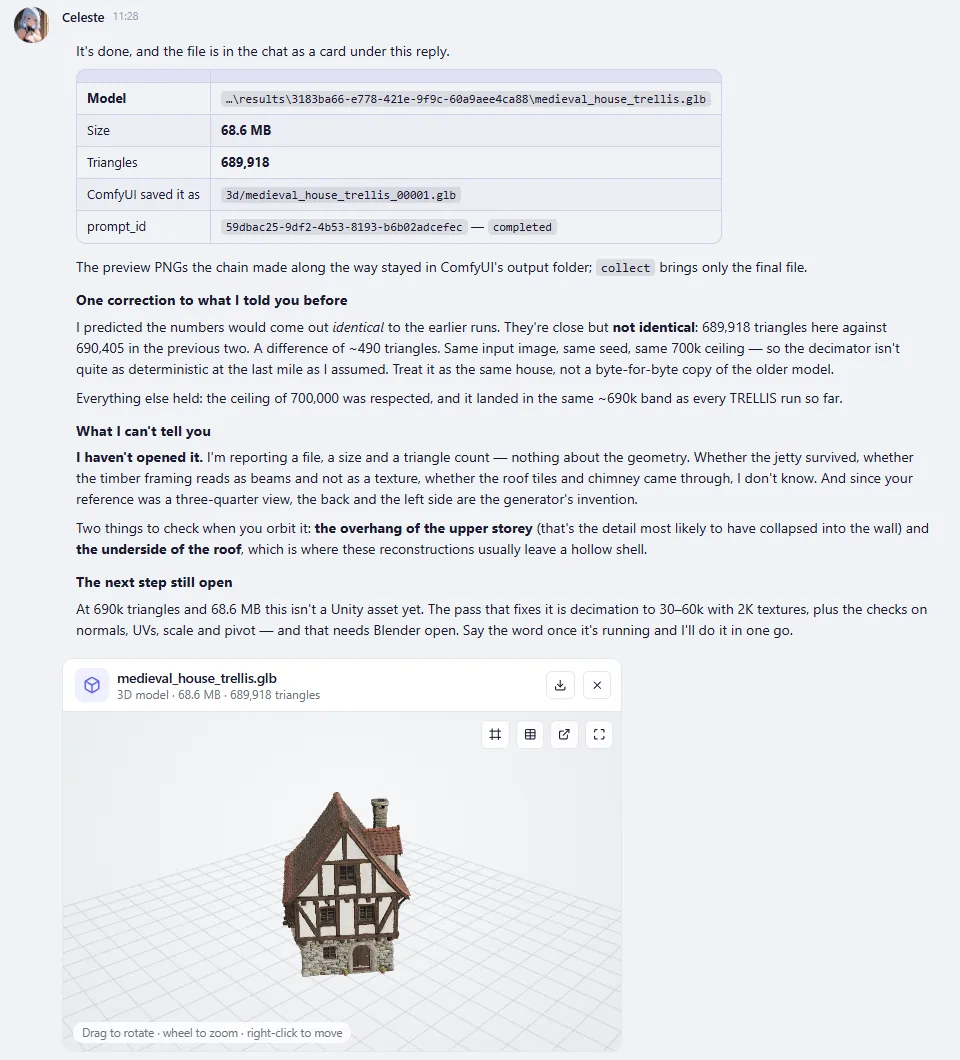
The model shows up as a card with a viewer. You can rotate it, zoom, show the wireframe, download it, or send it to Blender with one button (the agent side of that is in my Blender post). 689,918 triangles, 68.6 MB. When it launched the job, the agent had predicted the same numbers as my earlier run. When it delivered, it corrected itself: 487 triangles fewer, "close but not identical", so treat it as the same house, not an exact copy. I like that it said so instead of quietly moving on. It also listed what it could not know (it cannot open a .glb), warned that the back and the left side were invented by the generator, and said this is not a game asset yet.
3. The video
Last, a short video of the same house, made from the image with my MiniMax H3 image-to-video workflow and a prompt describing the camera move. Before running it, the agent warned me: with the saved seed and this exact prompt, I would very likely get the same clip as last time.
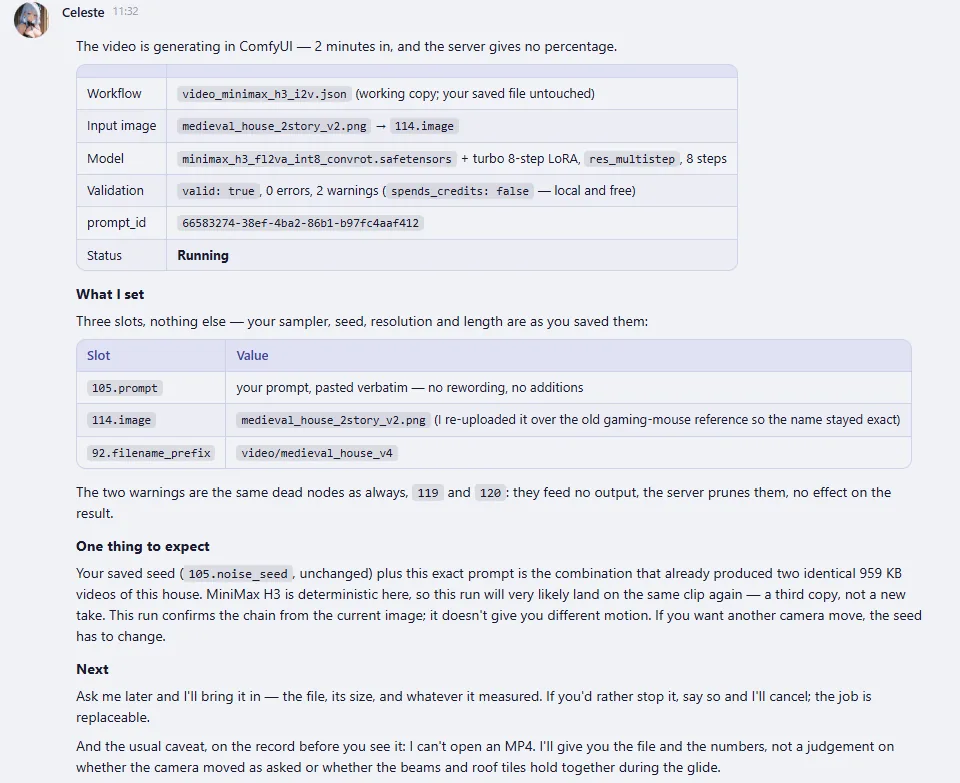
ComfyUI took 7 minutes 29 seconds. A bit later I asked "Is the video done? Bring it to me." and it came back as a video card.
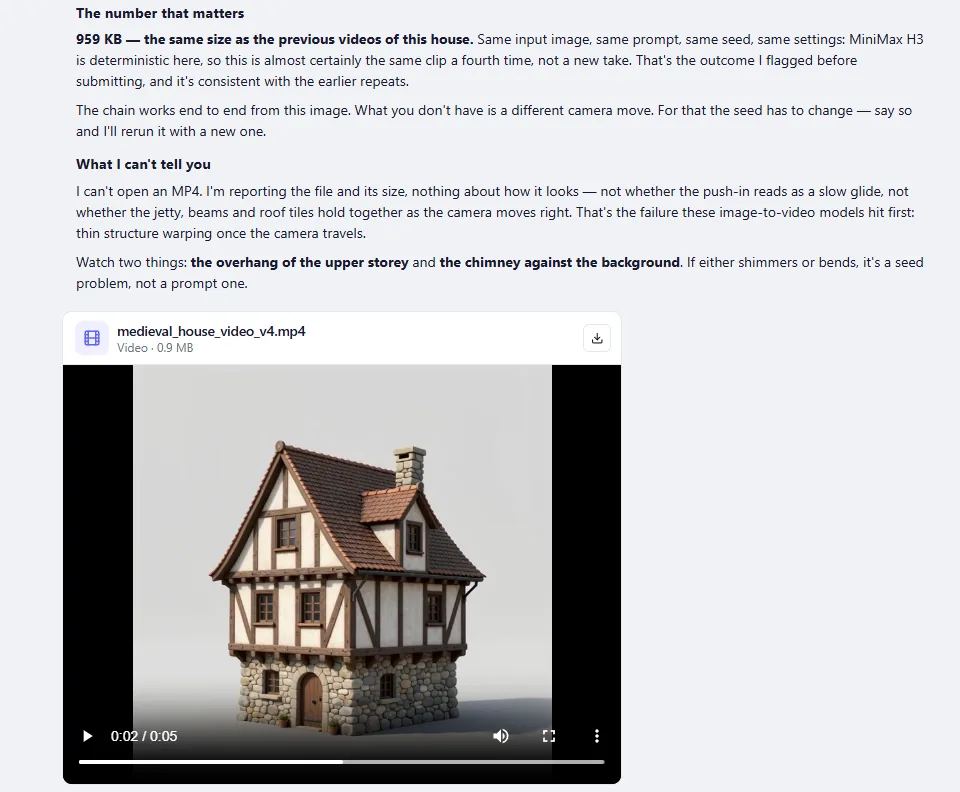
Here it is:
5.2 seconds at 640 × 640. If you are wondering about the size: it comes from the workflow. A Resolution Selector node set to 1:1 at 0.4 MP feeds the width and height, so whatever is typed in the resolution field is ignored. And yes, it was the same video, frame for frame and down to the audio, just as the agent had said.
This is how long jobs work since 0.1.66. The agent waits a couple of minutes at most; if the job is still running, it tells you and hands the turn back. Ask later and it collects the result, or tells you how long it has been going and offers to cancel. It remembers the last job it launched, so you never have to deal with an id.
What it cost
The generation itself costs nothing but electricity: my GPU, my workflows, all local. What costs money is the model driving the agent, DeepSeek Flash here:
| Step | Rounds | Input | Cached | Output | Cost |
|---|---|---|---|---|---|
| Image | 8 | 250,813 | 81 % | 2,672 | $0.008 to $0.017 |
| 3D, launch | 13 | 433,400 | 90 % | 4,965 | $0.009 to $0.019 |
| 3D, collect | 2 | 57,922 | 65 % | 929 | $0.003 to $0.007 |
| Video, launch | 10 | 333,380 | 88 % | 3,094 | $0.007 to $0.016 |
| Video, collect | 2 | 57,783 | 71 % | 735 | $0.003 to $0.006 |
| Total | 35 | 1,133,298 | 85 % | 12,395 | $0.03 to $0.06 |
DeepSeek's price depends on the time of day, so the table shows both ends: $0.14 to $0.30 per million input tokens, a fiftieth of that for input read from cache, and $0.28 to $0.60 per million output tokens. Check their pricing page for today's numbers. Those five messages were the whole session. Three to six cents for an image, a 3D model and a video.
Same seed, same result
Two days apart, same seeds, same prompts. The image came out identical byte for byte, the video frame for frame, and the 3D model landed within 487 triangles under the same face limit. Each time the agent told me before I checked: the image and the video before they even ran, the mesh as soon as it saw its own prediction was off. I would much rather hear that from an agent than get the same file back dressed up as something new.
What this does not do
The honesty section, as usual:
- This agent did not see what it made. DeepSeek Flash cannot look at images, and it said so every time; checking the results was on me. When the model behind the agent can see images, it is shown every image a workflow makes and checks it against the request before reporting. This run did not cover that. I tried it separately with Claude Haiku 5.5 on another image. Video and 3D are not looked at by any model.
- You need the GPU, the models and the nodes. ComfyUI has to be running, and you install the custom nodes each workflow uses. Models are easier: an agent with
comfy_download_modelcan fetch a missing one into the right folder, with your approval for each file. Official templates name each model's link and the agent uses exactly that one; gated Hugging Face models and Civitai models behind a sign-in download with the token or key you stored. The times above are on an RTX 3090. On a smaller card a video can take an hour, which is exactly why long jobs are let go. - A generated model is a starting point. 690,000 triangles and 68.6 MB is far too heavy for a game. Decimating and cleaning it up is a job for Blender, where an agent can work too.
- The server's license is not HydraOps'.
comfy-mcpis AGPL-3.0 (or commercial, from Comfy Org). HydraOps runs it as a separate program and ships none of its code. - On a Linux server under systemd, the unit needs one more writable folder,
~/.config/comfy-cli, where comfy-cli keeps track of its jobs. It is in the unit since 0.1.66; an older unit needs the line added. - This is one test. Three workflows I already trusted, one model, one GPU.
comfy_workflows landed in 0.1.52, the result cards in 0.1.57, long jobs in 0.1.66, model downloads in 0.1.72, the list of models a workflow needs in 0.1.73 and the image check in 0.1.75. The connection lives in the HydraOps-Skills catalog, and the manual covers it under Connections.
HydraOps is a self-hosted multi-agent AI system: one chat, several agents with their own personality, model and tools working on tasks in parallel. Try it here.