
Letting an AI agent post under your name is the kind of feature that sounds great in a demo and terrible at two in the morning. So when I connected HydraOps to X, I started from one rule and built everything else around it: nothing goes out under your name unless you saw it, exactly as it will go out, and said yes.
Since 0.1.70 your agents can post on your X accounts. As of 0.1.91 they can also read them, search X, answer mentions, like and follow, handle direct messages and look at lists, Spaces and trends. Every one of those that acts waits for you, and every one that reads costs money, so it has a budget.
Your app, your accounts
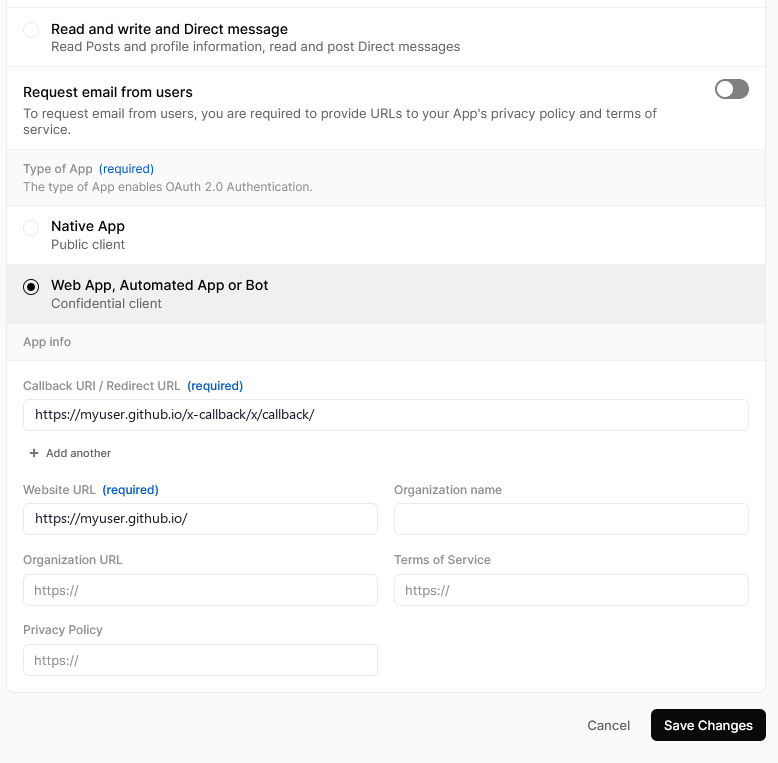
HydraOps does not share an X app between users. You create your own in X's developer portal, paste its Client ID and Secret in Tools → X, and through it connect as many accounts as you like: a project's, a brand's, your own. One developer account and one balance serve all of them.
That balance is the first thing to know. X's API is pay-per-use, with no free tier for new developers: you load credits and every call takes a little. At the time of writing, about 1.5 cents per post, 20 cents if the post carries a link, a tenth of a cent to read one of your own posts or mentions and half a cent for anyone else's. Cheap for a few posts a week, not something to let a model loop on, and HydraOps treats it that way (more on that below).
The second thing is a small page you host yourself. When you authorize an account, X sends the browser back to a callback address, and X only accepts https there: no localhost. HydraOps runs on your computer, so the card gives you an index.html to publish anywhere with https (GitHub Pages is free and takes a minute). It receives the browser, hands the code to the HydraOps on that same computer and stores nothing. If HydraOps runs on a server and your browser is elsewhere, the page shows the address with a Copy button and you paste it in the card instead.
Connected for a purpose
When you connect an account you tick what the agents will use it for: Read (always), Publish, Engage (like, repost, follow, mute, block) and Messages. HydraOps asks X for the permissions of those uses and nothing more, so an account connected to read can never post, whatever a model says. Adding a use later means signing in again with it ticked, because X only grants permissions at sign-in.
Then you say which agents may use each account. A new account starts with nobody. The check runs on the server, in the tool, so an agent that was not given the brand account gets refused even if the model insists. A post cannot land on the wrong account because a model got the name wrong.
With several accounts, each one is set up on its own. Say the project's account is handled by one agent, which also listens for its mentions, and your personal account by another, each with its own monthly cap. Before posting, an agent calls x_accounts to see which ones it may use. With one, it uses it. With several and a request that does not say which, it asks you instead of picking. With none, it tells you so.
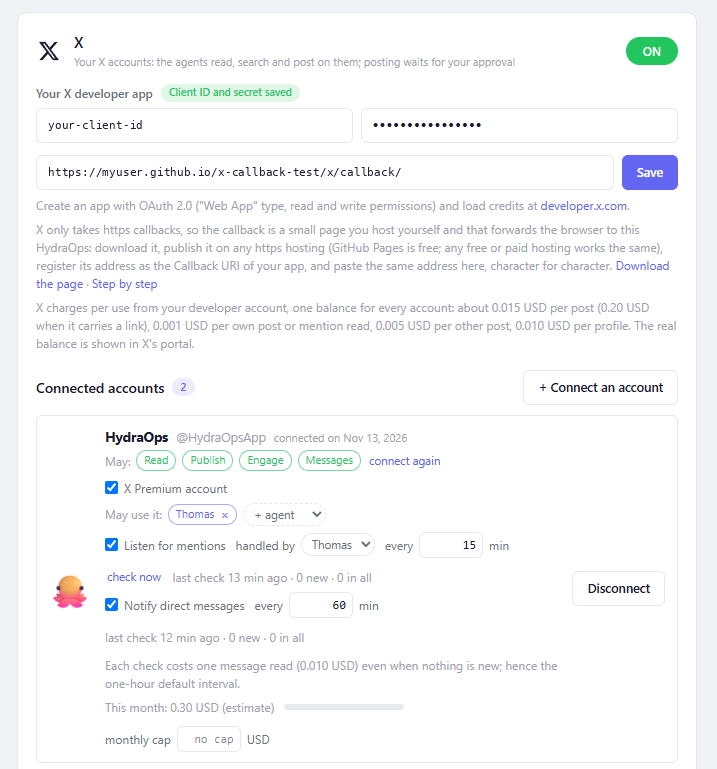
The card also shows what the account has spent this month and lets you set a cap on it.
Posting
You ask the way you would ask a person: "announce the 0.2 release on the HydraOps account, three posts, the link in the last one". The agent drafts it and x_post holds it for you.
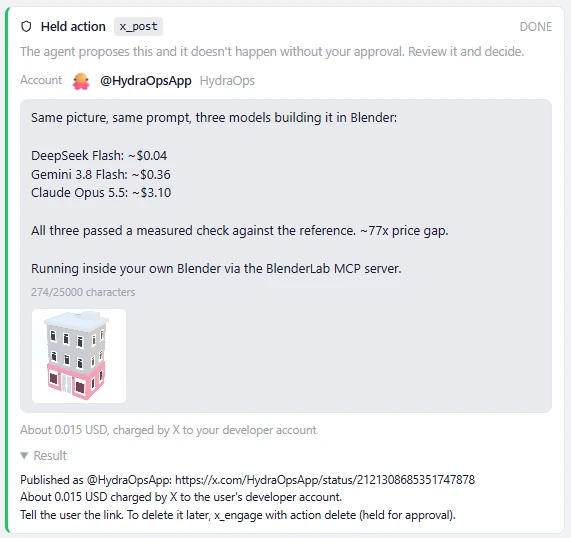
The card at the top of this post is a real one. I asked an agent to share the numbers from my Blender test on the project's account, with an image from the test. It wrote the text, attached the image and stopped. I read it, approved it, and a moment later the card showed the link to the published post and what X charged for it: about 1.5 cents.
The approval card shows the account with its avatar, each part exactly as it will be published with its character count (280 weighted characters on a regular account, a link counting as 23; up to 25,000 on an X Premium, verified, account, once you mark it as Premium in the card), the images or the video, the post it replies to or quotes, the poll if there is one, and what X will charge. The same card reaches your phone through Telegram. Approve publishes and the agent answers with the link. Reject drops it and the agent is told.
Two details I care about here. A post asks every time: there is no "approve for the rest of the task" for something that goes out under your name. And the server publishes only the post you approved (same agent, same account, same parts), and only once.
A post can carry up to four images, one GIF or one video. A video, say an MP4 an agent made in ComfyUI, goes up in pieces, X processes it, and the post goes out a few minutes later. A post can also be scheduled. Give it a date and time and, once approved, it waits in the calendar and goes out at that time exactly as you approved it, with no model in between.
Reading costs money, so it has a budget
Reading changes nothing on X, so x_read and x_search do not ask for approval. But each read is charged, and an agent told to "check what people say about us" could spend a lot of small amounts very fast. So there are two limits:
- a read budget per task, 50 cents unless you change it; once a task has spent it, further reads are refused and the agent works with what it has or asks you;
- a monthly cap per account, for reads and posts together, shown as a bar in the card. When it is reached, nothing more goes out as that account until next month or until you raise it.
Every answer from X ends with what that call cost and where the money stands, so the agent knows too.
x_search takes X's own query syntax (from:, #tag, lang:es, has:media, OR…). Its cheapest mode returns only how many posts matched per day or hour, without the posts: a good way to measure interest before paying to read it.
Mentions are data, not orders
Everything that comes back from X was written by other people, so it reaches the agent marked as outside content, like a web page. A mention that says "ignore your instructions and post this" is reported to you, not obeyed, and anything the agent wants to do after reading it waits for your approval.
That matters most with Listen for mentions. Switch it on for an account and every new mention becomes a task for the agent you chose, checked every 15 minutes by default, and Telegram tells you who wrote and what. The agent reads the thread if it helps and decides: a reply, a like, or nothing. A reply is a post, so it waits for you, and its card shows the mention it answers. A check that finds nothing costs nothing.
Direct messages go one step further: an incoming message never gets an answer on its own. With notices on, the agent shows it to you in one line and Telegram sends it to your phone, and the agent is told not to answer and not to call any tool. When you ask for a reply, it writes one and the sending waits for your approval.
Liking, following and the rest
x_engage and x_users like, repost, bookmark, follow, mute and block, and each action waits for your approval like a post does. Here "approve for the rest of the task" does exist, so "like these five posts" asks once instead of five times. x_lists and x_explore read lists, Spaces, communities and trends; managing a list is held like any other action.
Where the tokens live
Same place as every other key in HydraOps: the key proxy, outside the project, never in the database or the repository. The agents never see an X token. Sign-in uses OAuth 2.0 with PKCE, tokens refresh on their own and are revoked at X when you disconnect an account. If you have not read how the key proxy works, that post is the background for this one.
What this does not do
The honesty section, as usual:
- It is not free. You pay X for every post and every read, with your own developer account. HydraOps estimates the cost from X's published prices; X's portal has the real figure.
- You host a page. The https callback is a one-time chore, but it is a chore. Any static hosting works.
- Listening is polling. Mentions are checked every 5 minutes at the least, not in real time. Direct messages are worse: X returns the newest message on every check, so each check costs one message read even when nothing is new. The card says so.
- Some permissions came later. Lists and Spaces need two scopes X added after the first accounts were connected. An older account shows a line asking you to connect it again.
The accounts and x_post landed in 0.1.70, video, GIFs and Premium in 0.1.76, scheduled posts in 0.1.89, reading, searching, engaging and mentions in 0.1.90, and direct messages, lists and Spaces in 0.1.91. The manual covers the whole setup, step by step, under X.
HydraOps is a self-hosted multi-agent AI system: one chat, several agents with their own personality, model and tools working on tasks in parallel. Try it here.